
Building interactive elements natively is incredibly straightforward. By using standard progress bar WordPress blocks in the Gutenberg editor, you avoid overwhelming your site with heavy third-party scripts. This ensures that your page speed remains fast and provides a great mobile experience.
Table of Contents
Developers often choose this approach to maintain complete control over the visual output without relying on external assets.
Best Progress Bar Plugins for WordPress (2026)
For non-coders, installing a dedicated add-on is the fastest path to success. The official repository features numerous highly rated options that require zero technical expertise.
You can easily find top-tier, free WordPress animated progress bars that include modern, responsive templates right out of the box. These tools provide extensive styling settings, allowing you to easily customize the progress bars to perfectly match your brand’s typography.
Before installing, always test the progress bar demo provided by the developer. This quick check ensures the element renders beautifully across both desktop and mobile screens.
Spotlight: SKT Skill Bar
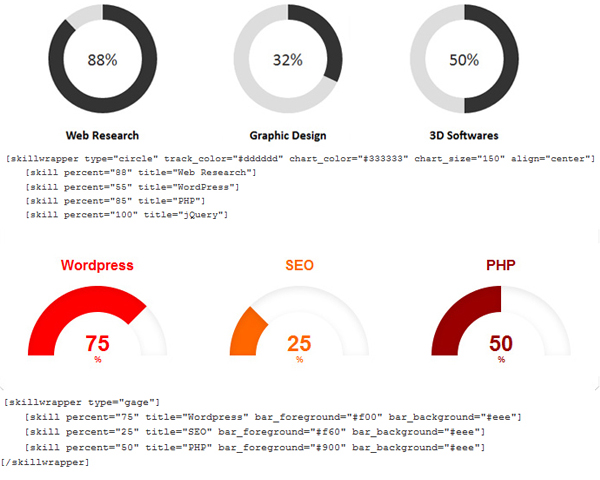


We would like to extend a huge thank you to the WordPress.org moderators who quickly checked and approved our plugin. Such rapid approval demonstrates our commitment to maintaining the highest coding standards.Our tool utilizes stunning animated progress bars to show the advancement of any skill, timeline, or countdown.This is very useful when someone wants to showcase their skills on their resume website or online portfolio.
It also comes in handy for showing the completion status of an ongoing project. This plugin is completely free and you can easily find it directly in the WordPress repository.
Click here to view the live demo link for SKT Skill Bars in action. To get started immediately, simply grab the WordPress animated progress bars download and install the file.
Add Stylish Progress Bar in WordPress | Step-By-Step Guide
To display technical proficiencies on a digital resume, a classic horizontal progress bar remains the industry standard. It is highly scannable and instantly recognizable to your visitors.
Alternatively, visual page builders offer excellent drag-and-drop solutions. Dropping a circle progress bar elementor widget onto your service page creates an immediate, professional data visualization.
How to Create Progress Bars With WordPress Blocks?
Using the default editor gives you incredible design flexibility. For unique custom layouts, you can insert a css loading bar animation via an HTML block. This creates a fluid visual effect while keeping your backend code exceptionally clean.
How To Make Scroll Activated Animated Progress Bars In 2026
Triggering a progress bar loading animation precisely when a user scrolls into view holds their attention effectively. Watching the animation progress dynamically encourages visitors to pause and read the accompanying text.
For checkout pages or multi-step forms, placing an animated loading bar at the top of the screen clearly communicates important milestones. Implementing these visually dynamic features sets your user experience apart and sends strong engagement signals to search algorithms.
Which WordPress Progress Bar Plugin Should You Use?
Choosing the right tool depends on your specific design needs and level of technical knowledge. If you want a lightweight solution without complicated settings, the SKT Skill Bar is recommended.
For those who prefer a page builder, add-ons that work with Gutenberg or third-party editors offer excellent drag-and-drop functionality. Always prefer plugins that offer responsive layouts, clean code, and good community reviews to avoid any issues in the long run.
Frequently Asked Questions About the Best Progress Bar Plugins for WordPress
Why should you use a progress bar on your WordPress site?
Visual indicators naturally encourage users to complete tasks. They effectively showcase your team’s expertise, ongoing donation campaigns, or learning milestones on your page.
Do progress bars slow down your website?
Good quality visualization tools are lightweight and very well optimized. As long as you don’t put too many animations on a single page, they won’t negatively impact your page loading times.
Can you customize the design of the progress bar?
Yes, most tools have multiple styling options. You can easily change the background color, typography, angle, and look of the track to suit your brand identity.
Do progress bars work on mobile devices?
Nowadays indicator plugins are built with responsive design frameworks. They automatically adjust their size and layout to look perfect on smartphone, tablet, and desktop screens.
Do I need coding knowledge to add a progress bar?
No programming skills are required when using visual blocks or special plugins. All you have to do is install the tool, adjust the settings from the visual dashboard, and publish your page.
 Sonal S Sinha is a digital architect and seasoned developer with over 16 years of experience in the web world. As the founder of a premier design and marketing agency, he has helped thousands of startups and small businesses define their identity through custom WordPress theme development.
A self proclaimed WooCommerce enthusiast, Sonal is dedicated to making professional design accessible to everyone. He regularly shares his expertise and a curated selection of free WordPress themes to help new creators launch with confidence. Follow Sonal for a consistent masterclass in scaling your online presence.


Great plugin! and i using it. thanks. but when i using those plugin and put it in a front page, it seems hidden on first load. am i right? how to make it always visible. thanks.
No actually if we make it visible always it will load but the effect won’t show because unless someone goes to that section if the thing loads first it will show up as an image and not as an animated bar.
Hence kept it likewise.