
What is HTTP Error 429 (Too Many Requests) and Why Does it Occur?
Hitting the http error 429 too many requests response stops users and developers cold — requests get blocked, workflows stall, and frustration builds fast. Whether you’re a site visitor who can’t load a page or a developer whose API calls are getting rejected, understanding what triggers this error is the first step toward fixing it.
Table of Contents
Rate limiting exists for a reason: it protects servers from being overwhelmed. But knowing why the error appears and how to resolve it quickly makes all the difference. The sections ahead break down exactly what’s happening under the hood.
What Does HTTP Error 429 Mean?
Understanding the http error 429 meaning is the first step toward fixing it. According to MDN Web Docs, a 429 status code means the client has sent too many requests in a given timeframe — and the server is pushing back to protect itself. Rate limiting is a deliberate server-side defense, not a malfunction. The next sections map out exactly where and why it triggers.
HTTP/1.1 429 Too Many Requests
Content-Type: application/json
Retry-After: 60

{
  "error": "Too Many Requests",
  "message": "You have exceeded the rate limit. Please wait before making more requests.",
  "code": 429
}
Whether you landed here after troubleshooting firsthand or found this guide through a thread on http error 429 reddit, this table of contents helps you jump directly to the most relevant fix.
What is HTTP 429 Too Many Requests?
HTTP 429 Too Many Requests is a client-side status code indicating a user has sent more requests than a server permits within a set timeframe. In practice, any platform with rate limits can trigger it — even routine activity like refreshing an order page can cause it, which is why some users encounter an http error 429 chewy when checking pet supply orders repeatedly. Rate limiting is a deliberate server-side defense, not a bug. Understanding that distinction shapes how you approach a fix — which the next section breaks down structurally.
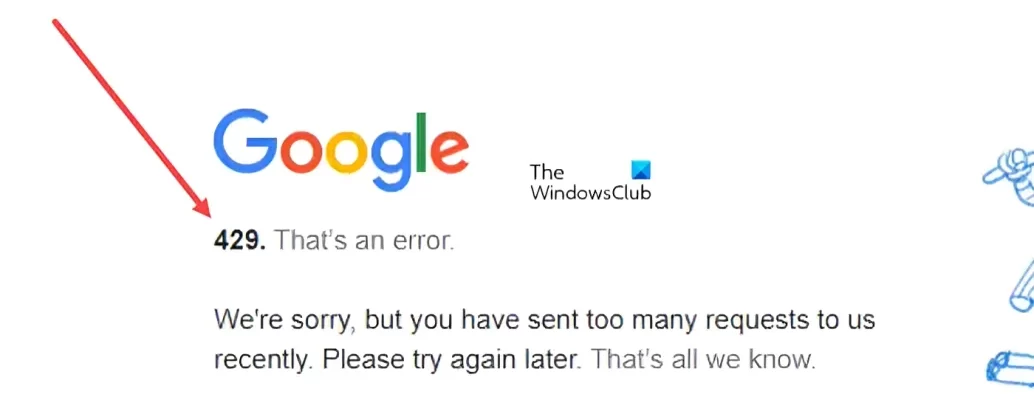
What Happens in the Anatomy of a 429 Response?
When a server returns a 429 status, the response typically includes a Retry-After header — a critical signal telling clients how long to wait before retrying. A well-formed 429 response is your server’s most actionable error message. This header may specify seconds or an HTTP date.
Users of apps like reading platforms (a common search: http error 429 mihon) encounter this exact structure when manga servers enforce request limits. Understanding what’s inside the response helps you diagnose — and fix — the problem faster, which is exactly where the next section picks up.
What Are the Common Causes of 429 Errors?
Understanding why 429 errors occur is the first step toward knowing http error 429 how to fix it effectively. The trigger is almost always the same: a client sends requests faster than the server’s rate limit allows.
Typical causes include:
- Automated scripts or bots hammering an API endpoint
- Misconfigured retry logic that floods the server after a failure
- Multiple app instances sharing one API key without coordination
Buggy client code is a surprisingly common culprit — a loop with no delay can exhaust a limit in milliseconds. Those causes directly determine which fix applies.
Exceeding Request Rate Limits
Rate limits define the maximum number of requests a client can send within a defined window — exceed that threshold, and a 429 fires immediately. Hitting a rate limit is the single most direct trigger for this error, whether you’re hammering a checkout API or, oddly enough, searching product availability on a high-traffic retail site like one selling http error 429 crocs footwear during a flash sale.
In practice, even legitimate traffic patterns can push clients over the line. Automated scripts, browser extensions making background calls, or apps that retry failed requests without any delay all compound request counts fast. As understanding your API’s rate limit policy before building against it is essential — not optional.
Beyond simple per-minute caps, many servers enforce sliding window or token bucket algorithms, which behave differently than fixed windows. That distinction matters when you’re planning retry logic — a topic closely related to concurrent request limits, which introduces another layer of throttling you’ll need to account for.
Concurrent Request Limits
Beyond per-minute or per-hour thresholds, many APIs enforce concurrent request limits — caps on how many requests can be in-flight simultaneously, regardless of overall rate. Sending 10 parallel calls at once can trigger a 429 even when your hourly quota is untouched. Platforms like LinkedIn are a clear example: http error 429 linkedin responses often stem from simultaneous automated requests rather than sustained volume. Throttling parallel connections is frequently the fix. Not every endpoint shares the same concurrency ceiling, which is exactly what the next section explores.
Endpoint-Specific Limits
Not all API endpoints share the same quota. Authentication routes, search endpoints, and write operations frequently carry stricter individual caps than general-purpose endpoints — a pattern sometimes called tiered rate limiting.
What typically happens: a client stays well within global limits yet still triggers a 429 by hammering one high-cost endpoint repeatedly.
Reviewing each endpoint’s documented limits separately is essential before assuming a single global threshold applies. That misunderstanding often sets the stage for the aggressive retry mistakes covered next.
Aggressive Retry Logic
Knowing where limits apply sets the stage for understanding why clients trigger them so easily. Aggressive retry logic is one of the most common culprits — when a client receives a 429 response and immediately retries without any delay, it floods the server with repeated requests, compounding the original problem rather than resolving it.
Retrying without a backoff strategy transforms a temporary rate limit into a self-inflicted denial of service.
In practice, poorly configured retry loops can escalate quickly. The fix is implementing exponential backoff — progressively increasing wait times between each retry attempt — which gives servers the breathing room they need to recover.
How Does Rate Limiting Work?
Rate limiting is the server-side mechanism that enforces request quotas by tracking how often a client calls an endpoint within a defined time window. When requests exceed the allowed threshold, the server responds with a 429 status rather than processing the overload. As most of the servers use this approach to protect stability and ensure fair access across all users. Understanding this traffic-policing logic is the first step toward diagnosing why a 429 appears.
How Do You Diagnose 429 Errors?
Before jumping to fixes, pinpointing the source of a 429 error saves significant troubleshooting time. Check response headers first — a well-formed 429 response typically includes a Retry-After header that reveals exactly how long the server imposed the block.
In practice, browser developer tools (Network tab) and server logs are the fastest diagnostic starting points. Look for clusters of repeated requests within a short window. A sudden spike in 429s almost always points to either retry storms or a misconfigured client, not a server-side outage.
Once the pattern is clear, resolving it becomes straightforward — which is exactly what the next section covers.
How Can You Handle 429 Errors Effectively?
Handling a 429 effectively means responding at the right layer — client, server, or application code. The core principle is simple: slow down, respect the limit, and retry intelligently. Whether you’re a developer integrating an API or an end user hitting a rate-limited site, the appropriate response depends on which side of the request you’re on. The next section covers the most reliable retry strategy — exponential backoff — in detail.
Implement Exponential Backoff
Exponential backoff is the go-to retry strategy when a 429 hits: instead of retrying immediately, each subsequent attempt waits progressively longer. A typical pattern doubles the delay — 1s, 2s, 4s, 8s — until success or a maximum retry cap is reached. Adding a small random jitter prevents multiple clients from hammering the server in sync. This approach is a critical detail to pair with the Retry-After header, which the next section covers directly.
Respect Retry-After Headers
While exponential backoff calculates wait times algorithmically, servers often tell you exactly how long to wait. The Retry-After header, included in many 429 responses, specifies either a delay in seconds or a precise HTTP date — and honoring it is the most reliable retry strategy available. Ignoring this header and retrying too soon almost guarantees another 429. In practice, parsing and respecting this value should take priority over any backoff calculation your client applies independently. Once waiting periods are handled correctly, the next logical step is controlling how many requests enter the pipeline in the first place.
Implement Request Queuing
Where exponential backoff and Retry-After headers manage when to retry failed requests, request queuing prevents failures from happening in the first place. A queue acts as a traffic controller — incoming API calls line up and dispatch at a controlled pace rather than firing simultaneously.
A practical approach is to maintain a queue with a configurable rate limiter that enforces a maximum number of requests per second or minute. This keeps outbound traffic within the server’s limits, eliminating burst-related 429 errors at the source.
A well-implemented request queue transforms unpredictable traffic spikes into a smooth, metered stream that servers consistently accept.
Reducing request volume through smarter structuring — like combining multiple operations into fewer calls — takes this concept even further.
Batch Requests When Possible
Where queuing controls the flow of individual requests, batching reduces their total count. Instead of sending ten separate API calls to fetch ten records, a single batched request retrieves all ten at once — consuming just one rate-limit unit instead of ten.
Batching is one of the most efficient strategies for staying under rate limits without sacrificing the data your application needs. In practice, grouping operations by type and timing them together dramatically lowers your request footprint. This pairs naturally with caching — a topic covered next — to further reduce unnecessary API calls.
Cache Responses Appropriately
Where queuing and batching reduce how many requests you send, response caching eliminates redundant requests entirely. If your application repeatedly fetches the same data, storing that response locally means the API never sees those duplicate calls. A well-configured cache can dramatically cut your request volume — making 429 errors far less likely before prevention strategies even come into play.
How Do You Prevent 429 Errors Before They Happen?
Batching and caching tackle specific inefficiencies, but prevention requires a broader mindset. Think of these strategies as layers: each one reduces your exposure to rate limits before a request ever leaves your application. Together, they form a defense that’s far more reliable than reactive fixes alone — and that’s exactly what the next strategy, proactive rate limiting, builds on.
Implement Proactive Rate Limiting
Proactive rate limiting means enforcing request caps on your own side before the API ever pushes back. Rather than waiting for a 429 to signal you’ve gone too far, build throttling logic directly into your client code. In practice, this acts as a self-imposed governor — keeping your traffic predictably within allowed thresholds and making the strategies covered earlier far more effective to monitor going forward.
Monitor Your Usage
Proactive rate limiting only works when you have accurate data backing your decisions. Without visibility into your actual request volume, you’re essentially guessing at safe thresholds.
Set up real-time usage dashboards that track requests per second, per minute, and per hour. Alert on anything approaching 80% of your quota — not 100%. Catching spikes early gives you time to throttle before a 429 forces the issue. Most API providers surface usage metrics in their developer portals; pull that data into your monitoring stack alongside your application logs for a complete picture.
These visibility habits tie directly into how rate limiting behaves across different production environments — which the next section examines in detail.
How Does Rate Limiting Work in the Real World?
Even with solid monitoring and proactive caps in place, rate limiting behaves differently across production environments. Real-world traffic is unpredictable — user spikes, background jobs, and third-party webhooks can all collide simultaneously. In practice, the gap between a well-tuned system and a 429-flooded one often comes down to testing under realistic conditions before those conditions find you first.
How Do You Simulate Rate Limits Before Deployment?
Testing your rate limiting logic before pushing to production prevents nasty surprises under real traffic. One practical approach is using load-testing tools to artificially spike request volumes against a staging environment. This reveals whether your throttling thresholds, retry logic, and Retry-After header responses all behave as expected — before actual users ever encounter a 429.
Catching misconfigured limits early is far cheaper than debugging a flood of 429 errors in production. Even small configuration gaps can cascade quickly at scale. That said, no simulation perfectly replicates real-world traffic patterns, so treat test results as a strong signal rather than a guarantee — a point worth keeping in mind as you review the most common mistakes teams make along the way.
What Are Common Mistakes to Avoid When Handling 429 Errors?
Even after testing thoroughly, teams still fall into predictable traps when handling 429 errors in production. Retrying immediately without any delay is the most frequent mistake — it amplifies the problem rather than solving it. Hammering an already-stressed endpoint only deepens the backlog.
Another common error is ignoring the response headers entirely. As Firebear Studio notes, servers communicate exactly how long to wait — but many implementations discard that signal completely. That leads directly to the next critical pitfall worth examining: ignoring Retry-After headers.
Ignoring Retry-After Headers
The Retry-After header is a direct instruction from the server — ignore it, and you’re essentially guessing when to retry. Servers include this header specifically to tell clients exactly how long to wait, yet many implementations skip reading it entirely and fall back on arbitrary delays instead.
In practice, honoring this header is one of the simplest wins available. When present, parse the value before scheduling any retry attempt.
The next section covers what happens when teams implement aggressive retry logic without these guardrails in place.
Implementing Aggressive Retry Logic
Aggressive retry logic — retrying too frequently with minimal or no delay — puts you in a feedback loop where each failed request triggers another, compounding the rate-limit problem rather than resolving it. Retry storms are a self-inflicted outage waiting to happen. Always implement exponential backoff with jitter to space retries sensibly and reduce server pressure over time.
Beyond proper timing, be equally careful about how many issues you’re actually tracking — which leads naturally into the next critical mistake: not monitoring your API usage at all.
Not Monitoring Usage
Ignoring retry headers and aggressive retries compound problems you’d catch earlier with proper monitoring. Without usage tracking, rate limit errors appear without warning — no patterns, no baselines, no early signals.
Unmonitored systems typically fail in predictable ways:
- Spikes go undetected until 429s cascade
- No visibility into which endpoints approach limits
Proactive monitoring turns reactive firefighting into prevention. Track request volume, error rates, and latency trends continuously — not just when something breaks. Even basic dashboards revealing unusual traffic patterns can stop a 429 storm before it starts.
That said, monitoring alone won’t protect you if the operations you’re retrying cause unintended side effects — which brings up a critical nuance worth examining next.
Retrying Non-Idempotent Operations
Not all requests are safe to retry automatically. Non-idempotent operations — such as POST requests that create records or trigger payments — can cause duplicate data or unintended side effects when retried blindly after a 429 error.
Retrying a payment submission multiple times charges a customer twice. Always confirm the original request’s outcome before attempting a retry on any operation that writes or modifies data.
What Are the Key Takeaways for Handling 429 Errors?
- Automated scripts or bots hammering an API endpoint
- Misconfigured retry logic that floods the server after a failure
- Multiple app instances sharing one API key without coordination
- Spikes go undetected until 429s cascade
- No visibility into which endpoints approach limits
Final Thoughts
HTTP 429 errors are preventable with the right combination of monitoring, backoff logic, and request discipline. Whether you’re a developer integrating an API or an everyday user hitting a rate limit wall, understanding the cause is half the battle. Avoiding the pitfalls covered earlier — like unmonitored usage and unsafe retries — keeps your requests flowing smoothly and your integrations reliable.
Still have questions? The next section tackles the most common 429-related FAQs directly.
429 Too Many Requests (FAQs)
Still have questions? Here are quick answers to the most common ones before diving into website-specific fixes.
What does HTTP 429 actually mean?
The server received too many requests from your IP or account within a set timeframe and is temporarily blocking further access.
Is a 429 error permanent?
No. It is a temporary status that resolves once the rate-limit window resets.
Can end users trigger 429 errors?
Yes. Browser extensions, auto-refresh plugins, or repeated page reloads can generate excessive requests and trigger rate limiting.
How do I get past the 429 Too Many Requests error on a website?
Wait before retrying, avoid repeated refreshes, and clear browser cache and cookies. Slowing down requests is the most reliable fix.
HTTP Error 429 (Too Many Requests) – how do I fix it?
Users should pause and retry later, while developers need proper rate limiting, retry logic, and request optimization strategies.
How to avoid HTTP error 429 (Too Many Requests) in Python?
Use request throttling, implement exponential backoff, add delays like time.sleep(), and respect the Retry-After header.
What does the HTTP 429 Too Many Requests error mean?
It is a client-side error indicating that too many requests were sent within a limited timeframe, exceeding server limits.
How to fix 429 Too Many Requests error in C#?
Implement retry logic using exponential backoff and delay requests using Task.Delay(), while respecting server response headers.
How to resolve the 429 Too Many Requests issue in WordPress?
- Disable problematic plugins
- Enable caching
- Block bots or malicious traffic
How to fix 429 Too Many Requests error on Cloudflare?
Review rate-limiting rules, adjust thresholds, and whitelist trusted IP addresses if necessary.
What causes the 429 Too Many Requests error?
Common causes include excessive API calls, aggressive scripts, misconfigured retry logic, or too many rapid user actions.
Why do I encounter the 429 error when logging into a website?
Repeated login attempts or automated retries can trigger rate limits designed to prevent brute-force attacks.
How do I fix HTTP error 429?
Reduce request frequency, wait before retrying, clear cache, and implement proper rate-limiting strategies if you are a developer.
Does error 429 go away?
Yes. It resolves automatically once the rate-limit period expires.
How to fix error code 429?
Slow down request frequency, retry after a delay, and follow server rate-limit guidelines.
How do I get past a 429 error on a specific site?
Wait 60–120 seconds, clear cache, or switch networks to reset IP-based limits.
Why is error 429 considered a client-side error?
Because the issue is caused by the client sending too many requests, not a failure on the server.
How to fix a network error 429 on the YouTube app?
Restart the app, clear cache, switch networks, or wait briefly before retrying.
How to fix “Error 429 Too Many Requests” on Shopify?
- Reduce API calls
- Disable heavy apps
- Retry after waiting
 Sonal S Sinha is a digital architect and seasoned developer with over 16 years of experience in the web world. As the founder of a premier design and marketing agency, he has helped thousands of startups and small businesses define their identity through custom WordPress theme development.
A self proclaimed WooCommerce enthusiast, Sonal is dedicated to making professional design accessible to everyone. He regularly shares his expertise and a curated selection of free WordPress themes to help new creators launch with confidence. Follow Sonal for a consistent masterclass in scaling your online presence.

