
SKT Plastic Surgery - Plastic Surgery Clinic WordPress Theme
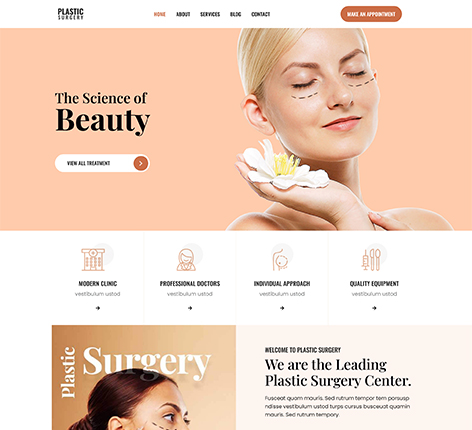
- Updated October 2026
- Working With Latest WordPress Version
- Updated Google fonts for GDPR and Other Country Privacy
- Updated to work with PHP 8+
- Updated to work with at least one page builder (Elementor, Gutenberg or SKT Builder)
- Compatible with popular plugins of SEO, contact form and WooCommerce
- Updated performance to work with popular cache plugins and Cloudflare
Comparison
- Less homepage sections
- No inner pages
- No Support
- No Typography Options
- No Icon Options
- No Header Layouts
- No footer Layouts
- Less plugins compatible
- Less updates
- Less flexibility
- More Time for Website Build
The Best Plastic Surgery Clinic WordPress Theme
In the aesthetic and healthcare medicine sector, your website can be the first point of contact for a patient. Medical procedures require a significant amount of trust from the patient. If a potential patient lands on a website that appears outdated, loads slowly, or is difficult to navigate, they’ll be sceptical of the facility’s quality and click to another site.
SKT Plastic Surgery, created by SKT Themes, offers a high-end medical Plastic Surgery Clinic WordPress theme. Created for cosmetic clinics, aesthetic physicians, and medical spas. This theme offers a clean, modern look and top-quality backend features to meet the demands of a busy medical practice.
It is fully integrated with drag-and-drop technology and functions as an elite Cosmetic Surgery Elementor WordPress theme designed to convert internet searches into scheduled appointments.
The strategic layout of an Aesthetics and Medical Website
A website designed for a surgical clinic is not a typical business brochure or a beauty site. It needs a unique structure that emphasises patient safety, displays real-time surgical outcomes, and manages patient questions in a safe manner, in accordance with search engine guidelines.
Who is the target audience for this SKT Plastic Surgery Framework?
Plastic Surgeons are surgeons with board certification who must describe complex surgical procedures (such as rhinoplasty, breast enhancement, and facelifts) with clarity and education.
Cosmetic Clinics: Multi-practice centres require an organised layout to showcase an array of non-surgical and surgical treatments.
Medical Spas (MedSpas) Aesthetic centres: The Medical Spas (MedSpas) Aesthetic centres that will offer non-invasive treatments such as chemical peels, laser resurfacing and injectables.
Dermatologists : Who require clear service blocks that separate medical dermatology from cosmetic treatments.
Focused Features of Plastic Surgery Clinic Elementor WordPress Theme
To establish itself as the most prestigious Plastic Surgery Clinic Elementor WordPress Theme, this template offers an extensive digital medical toolkit. Here’s the reason why
SKT Plastic Surgery is the most suitable choice for your clinic:
The elegant, sophisticated design is simple and minimalist, using calming corporate colours to soothe those who are anxious when they arrive on your site.
Seamless Integration with Elementor:
Create and change layouts visually. With the exclusive Plastic Surgery Clinic Elementor WordPress Theme, you can modify text, change sections, and update banners without programming.
Fluid Mobile Receptiveness:
People look up sensitive methods on their smartphones; this theme automatically scales to appear amazing on all mobile devices.
One-Click Demo Import:
Avoid the cost of web development. Start a professional, fully structured medical website in just a few minutes.
Before-and-After Gallery Section:
The Before-and-After Gallery Modules are an essential tool for aesthetic medicine. Elegantly and securely display changes in the patient’s appearance on grid or split screen layouts.
Frictionless Consultation Booking:
Works seamlessly with appointment booking plugins. So patients can make appointments anytime, anywhere.
Essential Web Vitals:
Optimised, lightweight programming ensures that your medical sites load immediately and reduces bounce rates.
SEO-Ready
Medical Coding is built with a semantic web standard to help your clinic rank on the first page of Google search results for specific terms, such as “Plastic Surgery Clinic WordPress Theme.”
Blocks for Doctors and Surgeons Profiles:
A dedicated area to introduce the board-certified surgeons, including their medical degree, board certifications, and professional certifications.
Advanced Forms for Patient Entry
Compatible with Contact Form 7 and WPForms to build secure, easy-to-fill appointment requests and contact sheets.
Complete Service Grid Layouts
Group your procedures neatly into non-surgical and surgical body, facial and even skin categories.
Sliders with Patient Testimonials:
Provide impressive social proof by displaying written or recorded testimonials from satisfied patients.
WooCommerce Compatible
Shop Features Fully designed to sell skincare products of clinical quality, as well as post-op kits for care or gift cards that are digital.
Google Maps Integration:
Drop a clear, interactive map on your contact page so patients in the local area can easily locate your clinic.
Global Translation and WPML-ready.
Provide the medical service you provide in several languages to meet patients from all over the world or with diverse local demographics.
Hi-Definition video support,
embedded video tutorials, or tour guides right in the headers to create an instant human-to-human connection.
Strict Security Framework:
Built on a secure, stable codebase that guarantees the complete security and privacy of your practice and information.
Retina-Ready Graphics
High-definition medical icons, logos, and structural diagrams remain sharp on the latest Apple or Android screens.
Unlimited Colour Customisation:
Easily modify accent tones to match your clinic’s colour scheme and branding colours.
Google Fonts Readerability
Hub Select from a variety of clean, highly readable sans serif fonts that will ensure that medical texts read easily.
Livelong code revisions,
constant theme updates to ensure compatibility with the latest WordPress software updates.
24/7 expert technical support.
Access to an experienced support team that can help you anytime you require assistance.
How to Design the Aesthetic Surgery and Beauty Clinic Website using the SKT Plastic Surgery Theme?
Designing a contemporary cosmetic surgery and beauty clinic website is now much
simpler with the SKT Plastic Surgery Theme and Elementor page builder. Follow these step-by-step directions carefully to build an efficient, speedy and visually appealing site.
Important Note:
Before starting, always install all recommended SKT Themes plugins. It is necessary for demo import, Elementor editing, widgets, sliders, and proper theme functionality.
Step 1: Purchase and Download the Theme
Visit the official SKT Themes website. Purchase the SKT Plastic Surgery Theme
Download:
- Theme ZIP file
- Documentation
- License details
Step 2: Install WordPress
Install WordPress on your hosting server.
Recommended:
- Latest WordPress version
- PHP 8+
- SSL certificate enabled
- Fast hosting for better loading speed
Step 3: Install the SKT Plastic Surgery Theme
Log in to WordPress Dashboard:
- Go to Appearance → Themes
- Click Add New
- Click Upload Theme
- Upload the theme ZIP file
- Click Install
- Click Activate
Step 4: Install Recommended Plugins (Very Important)
After activating the theme, WordPress will show a notification to install recommended plugins. Go to:
- Appearance → Install Plugins
Install and activate all recommended plugins, especially:
- Elementor Page Builder
- SKT Addons for Elementor
- Contact Form Plugin
- Slider Plugins (if included)
- SKT Templates Plugin
These plugins are required for importing demo templates and properly designing pages.
Step 5: Import Demo Content
Importing demo content saves huge design time.
Go to:
Appearance → Import Demo Data
OR
Template Directory
Select the Plastic Surgery demo and click:
- Install & Import
Wait until the import completes successfully.
Step 6: Customise Website Identity
Go to:
Appearance → Customize
Now update:
- Website logo
- Clinic name
- Favicon
- Brand colors
- Typography
- Header style
- Footer content
For aesthetic beauty clinic websites:
Use soft colours like white, pink, beige, gold, or pastel shades
Keep typography elegant and minimal
Step 7: Design the Homepage with Elementor
Go to:
Pages → Home → Edit with Elementor
Now customise sections step by step.
Recommended Homepage Sections
Hero Banner
Add:
High-quality clinic image
Catchy headline
CTA button like:
- “Book Consultation”
- “Schedule Appointment”
About Clinic
Add:
- Clinic introduction
- Experience details
- Certified surgeons information
Services Section
Show services like:
- Rhinoplasty
- Botox
- Lip Fillers
- Hair Transplant
- Skin Treatment
- Cosmetic Surgery
Use Elementor icon boxes for better visuals.
Before & After Gallery
- Add transformation images using:
- Elementor Gallery Widget
Testimonials
Display patient reviews for trust building.
Doctors Team
Show:
- Surgeon images
- Qualifications
- Experience
- Appointment Form
Add a contact or booking form.
Step 8: Create Important Pages
Create separate pages for better SEO and user experience.
Essential Pages
- Home
- About Us
- Services
- Gallery
- Testimonials
- FAQ
- Blog
- Contact Us
Step 9: Set Up Navigation Menu
Go to:
Appearance → Menus
Create a clean menu structure:
- Home
- Treatments
- About
- Gallery
- Contact
Documentation reference:
Step 10: Optimise Images
Beauty clinic websites use many images, so optimisation is important.
Tips:
- Compress images before upload
- Use WebP format
- Keep image sizes optimised
- Use lazy loading
It improves loading speed and mobile performance.
Step 11: Make the Website Mobile-Friendly
In Elementor:
Switch to Tablet and Mobile view
Adjust:
- Font sizes
- Spacing
- Image alignment
- Buttons
Always test:
- Mobile responsiveness
- Menu functionality
- Page speed
Step 12: Add Contact & Booking Features
Add:
- Contact form
- Google Maps
- WhatsApp button
- Click-to-call button
- Appointment booking form
It helps increase clinic inquiries and conversions.
Step 13: Improve Website Speed
Install cache pluginsAlso:
- Remove unnecessary plugins
- Optimise CSS/JS
- Use CDN if possible
SKT documentation also recommends performance optimisation and caching to improve load time.
Step 14: Add SEO Plugin
Install SEO plugins and Optimise:
- Meta titles
- Meta descriptions
- Service keywords
- Alt text for images
This helps your beauty clinic rank better in Google search results.
Step 15: Secure Your Website
Install security plugins, enable SSL, use strong passwords, and regularly back up.
Security recommendations are also documented in SKT.
Conclusion:
Relying on a generic, slow, or outdated blog design dilutes the elite professional status of your surgical practice. By stepping up to a dedicated Plastic Surgery Clinic WordPress Theme, you enhance your patients’ user experience and ensure your business stands out in local search results. SKT Plastic Surgery gives you the precise visual control, execution speed, and clinical authority you need to grow your patient list effortlessly.
Stop letting a weak website template hold back your medical practice’s growth.
Explore the SKT Themes premium collection today and lock down the ultimate professional digital foundation for your surgery clinic!
Also Included with Plastic Surgery Clinic WordPress Theme
-
Theme Files
Theme files are included in the zip you get when purchased
-
Sample Content
1 click demo import to set up home page easily
-
Free Installation
You will get free installation if you request us to install the Plastic Surgery Clinic WordPress Theme on your server with demo content


Reviews
There are no reviews yet.