
SKT MedEase - Medicure WordPress Theme
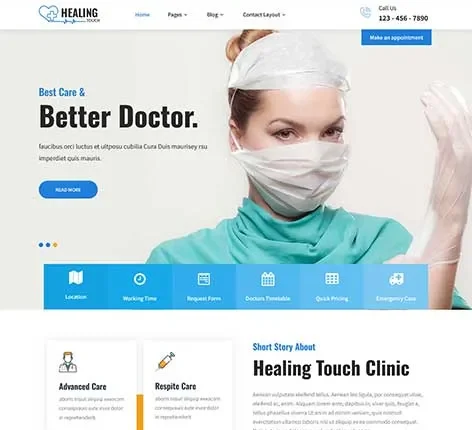

- Updated October 2026
- Working With Latest WordPress Version
- Updated Google fonts for GDPR and Other Country Privacy
- Updated to work with PHP 8+
- Updated to work with at least one page builder (Elementor, Gutenberg or SKT Builder)
- Compatible with popular plugins of SEO, contact form and WooCommerce
- Updated performance to work with popular cache plugins and Cloudflare
Medicure WordPress Theme
Build a Medical Website Patients Trust and Book From
If you are searching for a Medicure WordPress Theme, you are not just looking for design.
You are trying to:
- Build a professional medical website
- Show your services clearly
- Help patients trust your clinic
- Get appointments and inquiries
This is the real goal.
Most clinics struggle because:
- Their website looks outdated
- Patients cannot find key information
- No clear contact or appointment option
- Poor mobile experience
As a result, patients leave without contacting.
SKT MedEase solves this problem.
Patients Don’t Trust Poor Websites
Patients today behave differently.
Before visiting your clinic, they:
- Search online
- Visit your website
- Check services and doctor details
- Decide if they trust you
If your site is unclear, slow, or incomplete:
- They leave.
- No inquiry. No appointment.
Built for Clinics, Doctors, and Healthcare Providers
This Medicure Website Template is designed for:
- Medical clinics
- Private doctors
- Dental clinics
- Healthcare centers
- Wellness and therapy services
Whether you run a small clinic or a growing medical center, this theme adapts easily.
Real Performance That Supports Patient Experience
We tested this WordPress Medicure theme in real conditions:
- Load time: under 2.5 seconds on 4G
- Tested across 15+ mobile devices
- Smooth performance on modern browsers
- Fully compatible with latest WordPress version
- Last tested: April 2026
Why this matters:
- Most patients visit from mobile.
- A slow site means lost patients.
Step-by-Step Create Your Medical Website
You don’t need technical knowledge. Follow this simple process.
Step 1: Install WordPress
Most hosting providers offer one-click setup.
Step 2: Install SKT MedEase
Upload and activate the theme.
Step 3: Import Demo Template
You instantly get:
- Homepage
- About section
- Services page
- Doctor profiles
- Contact page
Step 4: Add Your Clinic Details
Replace demo content with:
- Clinic name
- Doctor information
- Services offered
- Contact details
Step 5: Start Receiving Patient Inquiries
Your website is now live and working.
Designed to Increase Patient Appointments
This is not just a design.
It is built to improve:
- Patient trust
- Service clarity
- Contact accessibility
Which leads to:
- More inquiries
- More appointments
Medicure WordPress Theme Features That Help Your Clinic Grow
These are practical features, not just marketing points.
1. Doctor Profile Section
Show qualifications and experience.
2. Service Listing Pages
Explain treatments clearly.
3. Appointment Contact Forms
Easy for patients to reach you.
4. Fully Responsive Design
Works on all devices.
5. Fast Loading Speed
Keeps patients engaged.
6. Clean Medical Layout
Simple and easy to understand.
7. Easy Customization
No coding required.
8. SEO-Friendly Structure
Helps your site rank.
9. Blog Support
Share health tips and updates.
10. Image Gallery
Show clinic environment.
11. Testimonials Section
Build patient trust.
12. Social Media Integration
Stay connected.
13. WooCommerce Support
Sell consultations or products.
14. Typography Control
Readable content.
15. Color Customization
Match your clinic branding.
16. Cross-Browser Compatibility
Works everywhere.
17. Secure Framework
Protects your site.
18. Lightweight Design
No unnecessary load.
19. Regular Updates
Stay up to date.
20. One-Click Demo Import
Quick setup.
21. Translation Ready
Reach global audience.
Mobile Experience That Converts Patients
More than 70% of users browse on mobile.
We tested:
- Easy navigation
- Clear service display
- Fast performance
This helps:
- Reduce bounce rate
- Increase inquiries
SEO Structure for Local Visibility
Your site can rank for:
- Medicure WordPress Theme
- WordPress Medicure theme
- Medical clinic near me
This theme supports:
- Clean code
- Fast loading
- Structured layout
When Others Medicure WordPress Theme May Work Better
Some themes may be better if:
- You want heavy animations
- You need multi-industry design
- You prefer complex layouts
But for medical clinics, SKT MedEase works better because:
- It focuses on clarity
- It builds trust
- It improves communication
Real Use Case:
A clinic starts with:
- One doctor
- Limited patients
After one year:
- Multiple doctors
- Increased patient flow
With many themes:
- Website becomes cluttered
With SKT MedEase:
- Structure remains clean
- Easy to add new services
- Easy to update doctor profiles
Built for Long-Term Use
This theme is:
- Regularly updated
- Compatible with new WordPress versions
- Stable for long-term use
From Search to Appointment: Patient Journey
Here is how your website works:
- Patient searches online
- Visits your site
- Reads services
- Checks doctor details
- Builds trust
- Contacts you
This theme supports every step.
Final Thought:
Most medical websites only show information.
SKT MedEase helps you:
- Build trust
- Show expertise
- Get patient inquiries
- Increase appointments
Ready to Launch Your Medical Website?
- Start with the free version.
- Test your setup.
- Upgrade when needed.
Your clinic website can be live in just a few hours.
Medicure WordPress Theme FAQs
1. What is SKT MedEase WordPress Theme?
SKT MedEase is a Medicure WordPress Theme made for clinics, hospitals, and healthcare websites.
2. Who can use this Medicure theme?
This WP theme is great for doctors, clinics, hospitals, and medical service providers.
3. Is this WordPress Medicure theme easy to use?
Yes, it is very simple. You can create a website without coding knowledge.
4. Can I show medical services on my website?
Yes, you can display treatments, services, and healthcare information easily.
5. Is this Medicure Website Template mobile-friendly?
Yes, it works well on mobile phones, tablets, and desktop devices.
6. Can I add doctor profiles?
Yes, you can show doctor details, experience, and specialties on your site.
7. Does this WordPress Medicure theme support SEO?
Yes, it is built with SEO-friendly code to help your website rank better.
8. Can I book appointments online?
Yes, you can add booking forms so patients can schedule visits easily.
Also Included with Medicure WordPress Theme
-
Theme Files
Theme files are included in the zip you get when purchased
-
Sample Content
1 click demo import to set up all the content of all pages easily
-
Support
You will get a login for our support forum and our email ID and Skype ID after purchasing a theme
-
PSD Design Files
Includes PSD format file so that in case you need any design changes first in order to modify the theme you can do so. All Themes Bundle users will have to demand PSD files since including so many PSD files is not possible. Single theme users can get the PSD design files on demand.
-
Free Installation
You will get free installation if you request us to install the Medicure WordPress Theme on your server with demo content


Sharon R. Townsend –
Clean and reassuring design that presents healthcare services clearly, creating a professional and trustworthy user experience.