
Kraft - Web Developer WordPress Theme
- Updated October 2026
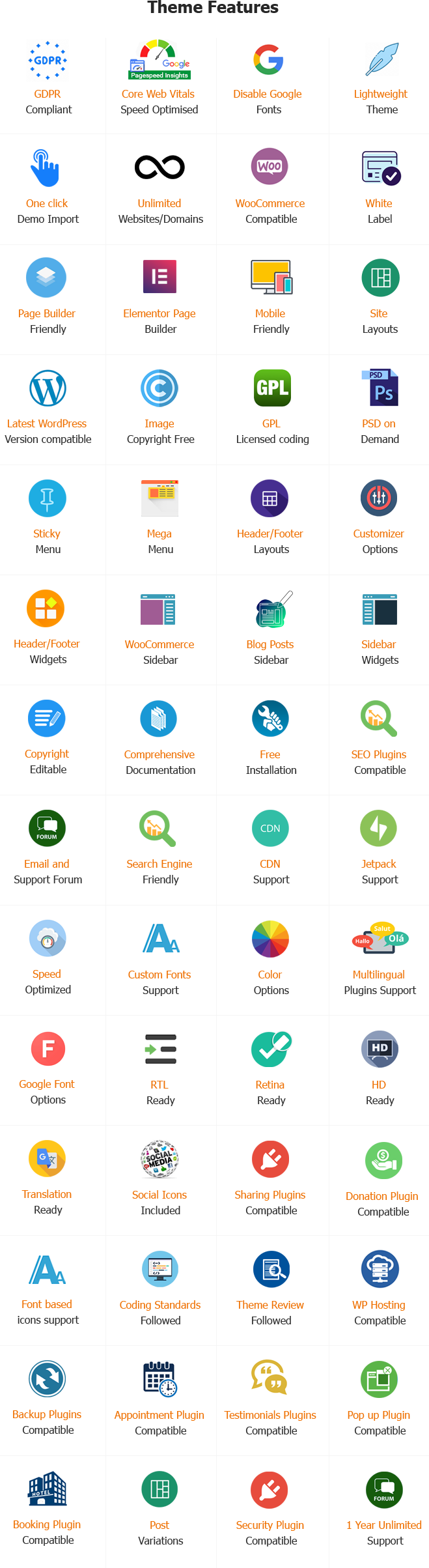
- Working With Latest WordPress Version
- Updated Google fonts for GDPR and Other Country Privacy
- Updated to work with PHP 8+
- Updated to work with at least one page builder (Elementor, Gutenberg or SKT Builder)
- Compatible with popular plugins of SEO, contact form and WooCommerce
- Updated performance to work with popular cache plugins and Cloudflare
Web Developer WordPress Theme
You build amazing websites for other people. However, your own website might look old and broken. Web developers often ignore their own portfolios. You spend all your time writing code for clients. You need a fast, beautiful website to attract better jobs.
The Web Developer WordPress Theme solves this problem entirely. It helps you build a stunning personal website. You can launch your portfolio in just a few hours. You do not have to write HTML or CSS from scratch.
In this massive guide, we will explore every single feature. We will show you exactly how to use it. This theme will help you build a highly successful developer portfolio.
What Is the Kraft WordPress Theme?
This is a premium web design template. It is built specifically for WordPress. It changes how your entire website looks. It is designed exactly for web developers, software engineers, and freelance coders.
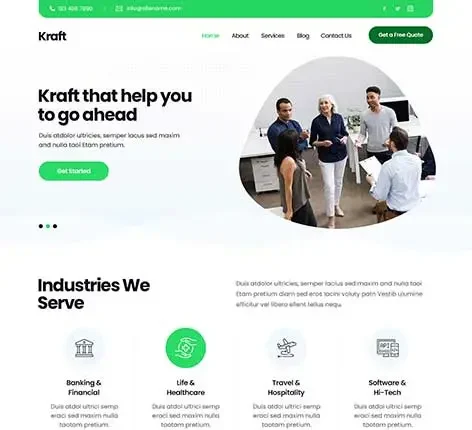
The theme features a dark, modern layout. It uses clean, technical fonts. It provides smart areas for your coding projects. It highlights your specific programming skills. It also includes powerful tools to help clients contact you securely.
Why Web Developers Need a Special Kraft Theme
You cannot use a generic business theme for a coding portfolio. A generic theme looks like a corporate office. You are a creator. Your website must look highly technical and modern.
Developers have unique business needs. You must show your code repositories. You must display your project case studies clearly. You need a digital resume to show your work history. A standard theme does not offer these specific technical tools.
Creating a Stunning Developer Homepage
Your homepage is your digital handshake. It must impress visitors instantly. This theme gives you complete visual control over your first impression.
Modern Hero Banner Layouts
You can choose from several pre-built homepage styles. You can show a large photo of yourself, a dark code background, or a video.
Customizing Your Personal Brand Colors
You must match your website colors to your personal brand. You can change these colors easily without writing CSS.
Choosing Technical Fonts
Typography changes how people perceive your skills. This theme includes hundreds of Google Fonts, including popular coding fonts.
Beautiful Project Grids
You must show multiple projects at once. You need to show websites, apps, and software tools cleanly.
Detailed Case Study Pages
Clients want to know how you solved problems. You must explain your coding process clearly.
Project Filtering Options
If you have many projects, clients must find specific types quickly. Filters help them do this easily.
Animated Skill Progress Bars
You can show your exact skill level for different coding languages visually.
Technology Icon Grids
You can display the logos of the software and languages you use daily.
Listing Your Certifications
You must prove your formal education and official certifications to build trust.
Building an Experience Timeline
You can show your past jobs in a clear, vertical timeline layout.
Displaying Your Education
You must highlight your college degrees or coding boot camps.
Adding a Downloadable CV Button
Some corporate clients need a PDF copy of your resume for their files.
Creating Service Boxes
You can create neat boxes that highlight your main offerings.
Building Pricing Tables
If you charge flat rates, you must display your prices clearly to avoid confused clients.
Offering Website Audits
A great way to get new clients is to offer a free review of their current website.
Displaying Client Testimonials
Clients trust other clients. You must let people read your positive reviews.
Showing Client Logos
You must show the famous brands or companies you have worked with in the past.
Writing Clear Work Processes
Clients will not hire you if they do not understand how you work. You must state your rules clearly.
Using Clean Code
Google robots read website HTML code. If the code is messy, Google ignores you. This theme uses perfectly clean code.
Fast Loading Speeds for SEO
Google heavily penalizes slow websites. This theme avoids heavy, bloated files.
Adding Meta Tags Easily
You must describe your pages to search engines. The theme works perfectly with SEO plugins like Yoast or Rank Math.
Phone Display Formatting
The theme shrinks and adjusts everything for mobile phones automatically.
Touch-Friendly Sliders
Mobile users swipe with their thumbs constantly. Your project sliders must respond to human touch.
Fast Mobile Loading
Mobile users have very low patience. If your site is slow, they leave immediately.
Sharing Coding Tutorials
You can write articles that teach other people how to code specific things.
Displaying Code Snippets
You must show actual code blocks in your blog posts. Standard themes make code look ugly.
Discussing Industry Trends
You can write about new software updates or design trends to show you are current.
Selling Digital Templates
You can code website templates and sell them to other people for passive income.
Selling Coding E-books
You can write an educational book and sell the PDF version online.
Selling Retainer Packages
You can sell monthly service packages like a standard product.
Creating a Simple Contact Page
You need a clean way for people to send you an email directly from your site.
Using Call to Action Buttons
You must tell visitors exactly what to do next.
Adding a Meeting Booking Tool
You can let clients book a video call with you directly on your website.
Linking Your GitHub Profile
GitHub shows your daily coding activity. It proves you are an active developer.
Displaying Your LinkedIn Profile
LinkedIn is where corporate hiring happens. You must link your professional profile.
Connecting a Twitter Feed
The tech community is very active on Twitter. You can show your latest tweets directly on your site.
Reliable Customer Support
Free themes offer zero help. If something breaks, you are completely alone.
Regular Security Updates
Hackers attack weak websites constantly. Free themes are often abandoned by their creators.
Unique Developer Features
Free themes are very generic. They lack the specific tools freelance coders need.
Using One-Click Demo Import
You do not have to build the site from a blank screen.
Customizing the Site Easily
You can change the sample data to your real data very quickly.
Launching Your Portfolio Fast
You can go live very quickly and start applying for jobs.
Using SSL Certificates
An SSL certificate encrypts data. It puts a small padlock icon next to your web address.
Forcing Secure Passwords
If you sell digital products, customers create accounts on your site. Weak passwords cause security breaches.
Backing Up Your Work
Mistakes happen. Servers crash. You must have website backups.
Final Thoughts
Building your own developer portfolio is a critical career step. You have great coding skills. You have built high-quality projects for others. Now, you need a digital storefront that matches your immense talent. A bad website makes great code look cheap. A beautiful website makes your skills look premium and highly desirable.
The Web Developer WordPress Theme provides everything you need to succeed. It gives you complete creative control over your portfolio. It handles complex layouts like timelines and skill bars smoothly. It processes digital product payments securely. It looks flawless on mobile phones.
You do not need to waste forty hours coding your own site from scratch. Your time is too valuable. You can use this theme to launch your professional portfolio this weekend. Take control of your freelance career. Present your coding projects beautifully. Build your online resume today and start landing higher-paying clients immediately.
Frequently Asked Questions About Web Developer WordPress Theme
Developers often ask specific technical questions before starting a portfolio. Here are the most common questions.
Do I need to know how to code to use this kraft theme?
No. Even though you are a developer, you do not need to write code to use this theme. You use visual tools. You drag and drop items on the screen to save time.
Can I add custom CSS or JavaScript if I want to?
Yes, absolutely. The theme includes specific settings panels where you can paste your own custom CSS and JavaScript. You have total technical control.
Is the kraft theme a one-time payment or a monthly fee?
You buy the web developer WordPress theme once. There are no monthly fees to use the theme itself.
Can I change the fonts and colors later?
Yes. You can change your brand colors and fonts at any time. The changes apply to your whole site instantly without breaking the layout.
Does the kraft theme include the photos from the demo?
No. The photos belong to the demo creators. You must take your own professional photos of yourself and your projects.
Can I run a blog and a portfolio at the same time?
Yes. The web developer WP theme handles both perfectly. You can write coding tutorials and display your past projects on the same website smoothly.
Can I accept PayPal for my digital products?
Yes. WooCommerce allows you to connect PayPal easily. Customers can pay for your templates or ebooks with their PayPal balance securely.
Will the theme slow down my website?
No. The web developer WordPress theme is built with incredibly clean, lightweight code. It loads incredibly fast to keep your clients and Google very happy.
What happens if I get stuck during setup?
You get access to our premium support desk. You can email our expert technical team. We will help you fix the problem quickly.
Can I translate the theme into French or Spanish?
Yes. The Kraft theme is fully translation-ready. You can translate every single word into any language you choose easily.
Does the theme support dark mode?
Yes. The WordPress web developer theme is designed with a dark, modern aesthetic by default. It appeals directly to the tastes of modern software engineers and web developers.
Is the Kraft theme compatible with major page builders?
Yes. The web developer theme works flawlessly with popular visual page builders like Elementor. You can build complex, animated layouts effortlessly.
Tags: design agency, creative agency, branding company, design studio, development company, marketing agency, marketing services, promotional services, interior design, digital studio, corporate, consultancy, information technology services, IT services, maintenance services, duty, office, group of people, firm, instrument, business, agent, representation, department, office, authority, corporation, government agency, service provider, IT service providers, repairing services
Also Included with Web Developer WordPress Theme
-
Theme Files
Theme files are included in the zip you get when purchased
-
Sample Content
1 click demo import to set up all the content of all pages easily
-
Support
You will get a login for our support forum and our email ID and Skype ID after purchasing a theme
-
PSD Design Files
Includes PSD format file so that in case you need any design changes first in order to modify the theme you can do so. All Themes Bundle users will have to demand PSD files since including so many PSD files is not possible. Single theme users can get the PSD design files on demand.
-
Free Installation
You will get free installation if you request us to install the Web Developer WordPress Theme on your server with demo content


Lucas Fontaine –
A creative and versatile theme perfect for craft businesses, artisans, and handmade product stores. Fully responsive, easy to customize, and designed to highlight products and portfolio pieces beautifully.